Adding a partner
Add a new partner with the Add Partner button on the Address Book page or in the menu Address Book → Add Partner. A form opens in a dialog.
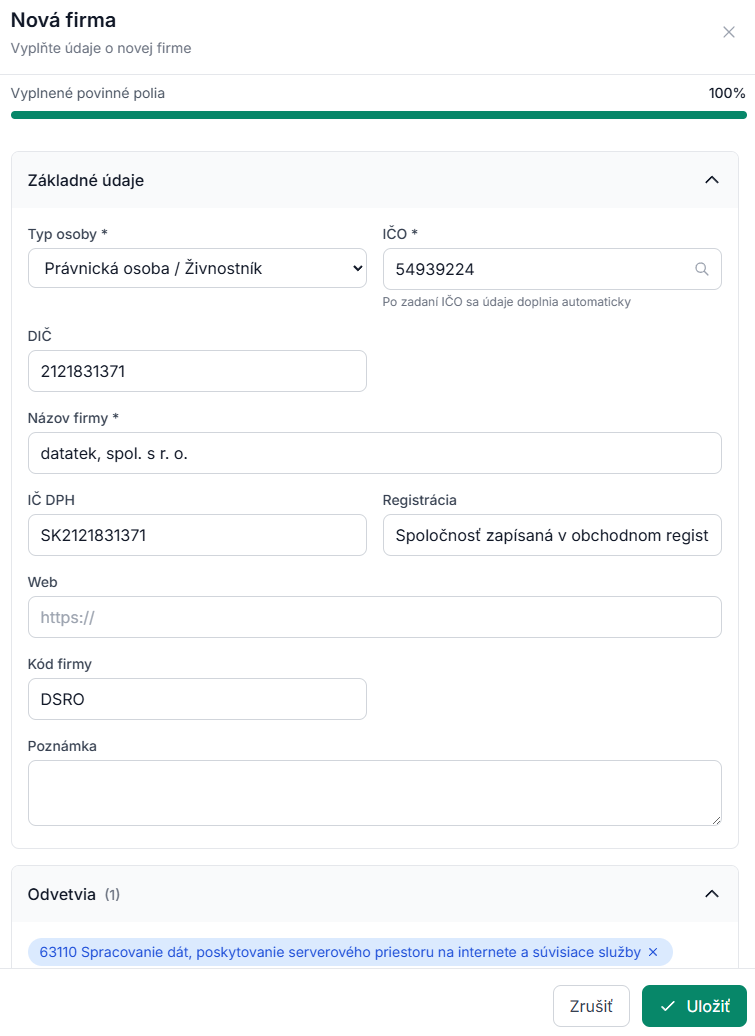
Person type
- Legal entity – a company; the name is mandatory, and for Slovak and Czech companies also the company ID (IČO).
- Sole trader – the contact person's first and last name are mandatory.
- Individual – a private person; first and last name are mandatory.
Changing the person type shows or hides the company ID, tax ID, VAT ID and registration fields.
Finding the company in the register (SK, CZ)
For legal entities the form starts with Find the company in the register (SK, CZ):
- Type the company name – a list of companies from the Slovak and Czech registers appears with the country flag, company ID and city. Dissolved companies are marked.
- Or type the company ID and press Load (or Enter).
After choosing a company, the name, company ID, tax ID, VAT ID, registration, registered address and activities (NACE) are filled in. Below the field a card shows the data source (FinStat, FinStat CZ or ARES), a link to the register and the partner's risks – e.g. bankruptcy, debts or state receivables, a payment order, listing among VAT payers with grounds for deregistration, or dissolution. Without risks you see "No risk records".
The same company ID in Slovakia and the Czech Republic: the numbering overlaps, so one number can belong to two different companies. Both are shown and you choose the right one.
You can also load data straight from the company ID field – when you leave the field (or press the magnifier) the data is filled in the same way.
Basic data
- Company name * – mandatory
- Company ID – mandatory for Slovak and Czech legal entities. For a foreign company (e.g. Austria, Poland, USA) the field is called Company ID / registration number and is optional – enter the number from the register of that country, if any.
- Tax ID, VAT ID – below the VAT ID there is Check in VIES, which validates the VAT ID in the European Commission register and shows the company name when it is valid.
- Registration (e.g. commercial register entry), Website
- Activities – choose or add your own
- Note – free text
Address
In the Address section: street, number, city, postcode, region and country. Always set the country – it decides whether the company ID is mandatory and how duplicates are checked. The address is saved as both the registered and the delivery address; add more addresses in the partner detail.
Contact
For individuals and sole traders fill in the contact person: titles, first name, last name, position, phone and e-mail.
Saving
Click Save – the partner is created, the dialog closes and the partner detail opens. Bank accounts and further contacts are added in the detail.
If a partner with the same company ID in the same country already exists, saving stops with "A company with this ID already exists in the address book". A Slovak and a Czech company with the same company ID can both be in the address book.
Interested in trying this feature? Activate innovanet with a free trial →