Partner detail
Open the detail by clicking a row in the company list or the View icon. You see the addresses, contacts, bank accounts and documents you have with the partner.
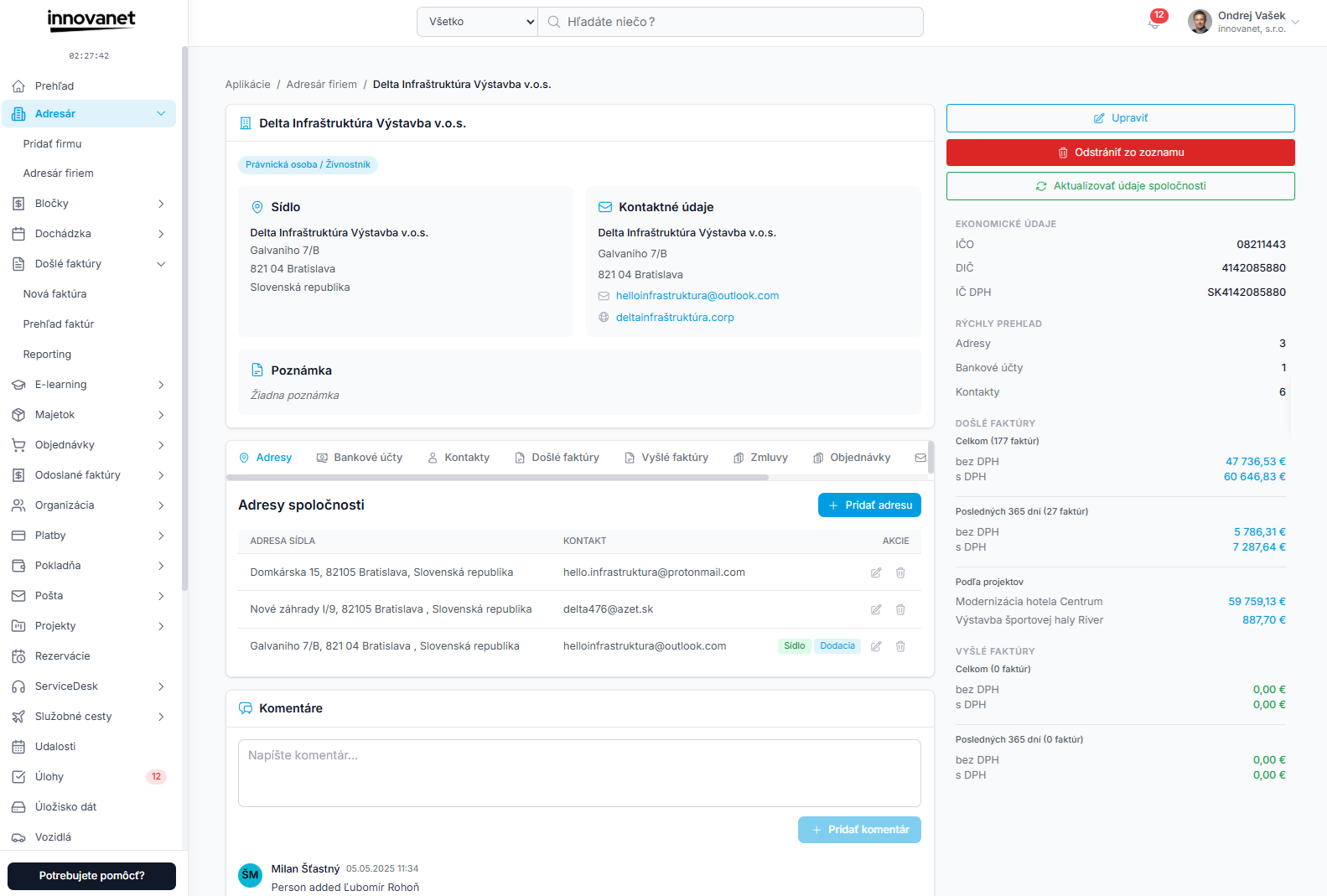
Top section
- Back to list
- Partner name, company ID, tax ID, VAT ID (with Check in VIES), registration, status and person type
- Edit, Remove from list (for a removed partner Restore company)
- Refresh data from register – loads the current data by company ID and adds a missing registered address. If the company ID exists in both Slovakia and the Czech Republic, the company with the same name or country of the registered address is used; if that cannot be decided, nothing is overwritten and you are asked to update the data in the edit form.
- Registered address, delivery address and the partner note
Tabs
| Tab | Content |
|---|---|
| Addresses | Partner addresses – add, edit, delete; Registered and Delivery flags. |
| Bank Accounts | IBAN, BIC and bank; add, edit, delete; default account. |
| Contacts | Name, title, position, phone, e-mail; add, edit, delete. |
| Incoming Invoices | Invoices where the partner is the supplier. |
| Outgoing Invoices | Invoices where the partner is the customer. |
| Contracts | Contracts where the partner is a party. |
| Orders | Orders with this partner. |
| Shipments linked to the partner. |
Document tabs are shown if you have permission for that module, or if you own at least one such document with this partner. New invoices, contracts and orders are created in their modules, where you pick the partner from the address book.
Comments
Below the tabs there are Comments – internal team notes about the partner. Every change of the partner's data adds an "[Audit]" entry with what changed.
Removed partner
For a removed partner the detail shows a notice and the Restore company button. See Removal and restore.
Interested in trying this feature? Activate innovanet with a free trial →